
Reporting
Reporting that stays close to the work.
See revenue, attendance, retention, and utilization in one reporting layer built for operators who need answers fast, not exports later.

Performance
Track the numbers that move the business
Studios need reporting that reflects operating reality: how classes are filling, how members are behaving, and where revenue risk is emerging.
- Monitor utilization, attendance, and retention in one place
- Compare performance across programs, time blocks, and locations
- See revenue context alongside the member and class signals behind it
Speed
Get to a decision without manual exports
Manual-first reporting creates lag. Gymizen keeps the most relevant metrics close to the workflows that depend on them so teams spend less time assembling context.
- Open current reporting without rebuilding spreadsheets
- Use live operational data instead of stale weekly snapshots
- Move directly from a weak metric to the affected members or sessions
Actionability
Connect reporting to next steps
The value of a report is not the chart. It is whether the team can act on what the chart is showing while there is still time to change the outcome.
- Tie reporting changes to concierge queues and workflows
- Spot classes, offers, or member segments that need intervention
- Keep reporting close to the workflows that improve the number
Visuals
See how reporting looks in the product.
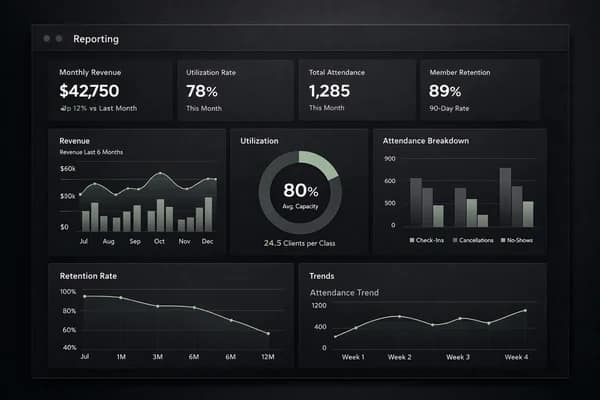
Revenue, attendance, and retention dashboard.
Testimonials
What operators say about this workflow.
“Reporting replaced a manual workaround our team was repeating every day. We can move faster without losing control.”
Avery Chen
Owner, Northline Pilates
“Once we put reporting inside the same operating system as bookings and member records, the whole workflow finally started to make sense.”
Marcus Bell
General Manager, Foundry Strength Club
Related features
Explore the connected parts of the platform.
Plan the next step
Follow this workflow into pricing, proof, and the live demo.
Good feature pages should connect the product detail to the next commercial decision. Use these paths to compare plans, read the operator material behind the workflow, or open the demo.
Next path
Pricing and rollout
Compare how reporting depth and rollout support change as brands grow from one site to many.
Next path
Operator resources
Go deeper on retention, scheduling, and operational reporting in the resources library.
Next path
Compare alternatives
See how Gymizen stacks up against the platforms operators usually compare during evaluation.
Next path
Try the demo
See how date-range reporting, drilldowns, and issue follow-up behave in the live product.
Start Free
Start a 30-day free trial or book a guided rollout.
Launch and Studio can start self-serve. Multi-location brands can book a demo for rollout planning, data migration, and commercial terms.